④ Quote & Order — Your Design Straight into the Cart
How to Read the Parts List
Press "Quote" at the top and your design is broken down by part type.
- Shelves — how many standard, single-side, double-side, and corner shelves there are
- Posts & other parts — accessories such as posts and hanger rods
- Part color labels — turn on the button at the top right and each part in the 3D view is paired with its list row in the same color. Use it when you can't tell which line is which part.
- Item total — the amount for the current layout (the final amount is confirmed on the order page).
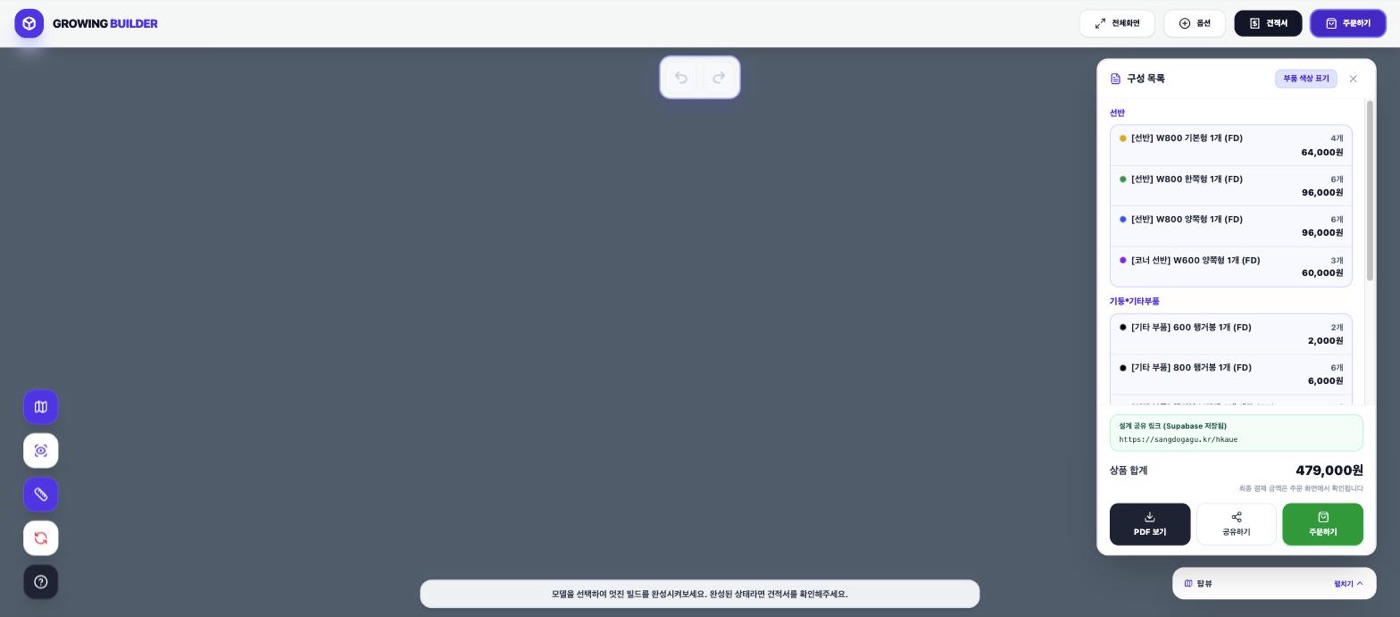
Use "View PDF" to download the quote to keep on file or use for approval.
Placing an Order
- Press "Place order" on the quote (or at the top of the screen).
- The parts in your design are loaded automatically into the Sangdo Furniture official store cart — a brief notice appears while they're being added.
- Review the cart in the official store and check out as usual, and you're done.
💡 Save a design share link before you order — later, when you want to add more bays, open that link and continue designing from there.